How To Set Up An Ergonomic Home Office

-
April 17, 2023
-
0 Comments
As you know, desk-based jobs could be bad for our health and our posture. For freelancers or remote workers, there are solutions to dealing with back discomfort, neck pain, wrist pain, and other side effects of working on the computer all day. The basic solution is setting up an ergonomic home office
What Is An Ergonomic Home Office ?
In simple words, an ergonomic home office is one that is highly suitable and comfortable for work. In addition, It should be safe and guarantees Maximim productivity. Ergonomics on the other hand, is the science of making your working day more physically comfortable. Hence some office products are designed to be ergonomic.
If you love working from home, there are many wonderful ergonomic options that can make your home office setting more comfortable, ranging from cushioned laptop pads for wrist support to specifically made computer mouse.
How To Set Up An Ergonomic Home Office
Lets take a look at devices you should consider if you intend setting up an ergonomic home office.
Good Standing desk
A good standing desk will cost you some money, but it may be well worth the investment on the long run. There are many height-adjustable standing desks available, which are useful because you can use them while sitting and standing, regardless of your height.
Ergonomic Keyboard
Microsoft's Sculpt Ergonomic Desktop Keyboard and Mouse Set (HuntOffice.ie, €135.24) includes both an ergonomic keyboard and a mouse. The keyboard is split and the number pad comes in its own distinct small keyboard, making it look a little different from your normal keyboard.
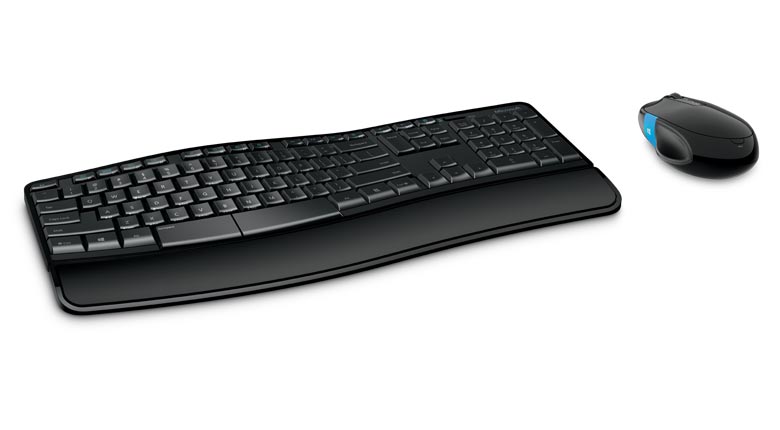
The split design is said to be more comfortable for typists' arms and wrists, as well as helping to correct and relax posture. In general, split keyboards are the most ergonomic and comfortable, so choose one and you will be able to improve your bad posture patterns. Conventional keyboards force our arms too close together while typing, resulting in unnatural wrist angles.
Ergonomic Mouse
Those who like to use a mouse in addition to or instead of a trackpad are not limited to the old-fashioned ones from the 1990s. There are many cool, ergonomically built mice on the market that are meticulously intended to prevent weary thumbs and locked wrists.

The LogiTech M220 Silent Wireless Mouse (€27.99) is not only silent, but it also looks great. It weighs less than two grams and is available in red and black or dark blue and black. It's ideal for on-the-go comfort. The Ergo M575 Wireless Trackball mouse, also from LogiTech, has a rolling trackball that is intended to assist prevent repetitive strain injuries. On the LogiTech website, it costs €54.99.
Ergonomic Chair
An ergonomic chair is most likely the most significant purchase you will make while outfitting your home office. Even if you have a standing desk, you should have a good, comfortable chair that is contoured to your back for when you need to sit. You should aim to find a chair that supports as much of your body as possible, preferably one with a high back that supports your neck and spine.
Other devices or gadgets you might need to set up an Ergonomic office includes:
- Laptop riser
- Cushions and pillows
- Rolled-up towel
- Orthopedic seat
- Footrest
- Voice dictation software
- Microphone
- White noise machine
- Lamp
If you found this article informative and helpful, log on to Hubforjobs.com for more. Click here Hubforjobs
You can also connect with Hubforjobs on all their social media handles for more regular job updates.
Facebook: @Hubforjobsofficial
Instagram:@hubforjobs
Twitter: @hubforjobs
LinkedIn: @HubForJobs
Telegram: Hubforjobs
KPMG: Company Profile, Overview, and Culture
Travel Consultant Jobs
Recent Post
-
-
 WorkFlowsHR: the best HR software in Nigeria July 25, 2024
 -
-